9 Global Variables
This chapter is a work in progress. The content may be incomplete, inconsistent, or subject to significant revision. Reader discretion is advised.
Global variables are used to store information that needs to be accessed across different procedures and throughout the simulation. In LogoClim, global variables are used to manage the state of the climate data, model settings, and other relevant information that is essential for the model operation.
Before diving into the specific variables used while integrating LogoClim with other models, it helps to understand what each of them does.
In NetLogo, all choosers, input boxes, sliders, and switches from the interface are global variables, which are covered in the How It Works chapter. The variables described here are not tied to the interface directly, but they are essential to how the model works under the hood. They manage data and settings internally, so you won’t be able to see or change them through the user interface.
9.1 LogoClim Global Variables
These are the global variables used in LogoClim that are not directly linked to the model interface, but are crucial for its functionality.
-
index(number): The index of the files being used in the simulation. It always starts at 0 and is incremented by 1 at each tick. It is directly related to thefilesglobal variable, as it indicates which file from the list is currently being used to update the climate data in the model. -
dataset(gis:RasterDataset): A object from the GIS extension containing the climate data for the current tick’s file index. Created by thegis:load-datasetcommand. -
files(list): File paths for the climate data used in the simulation. The list starts with the file corresponding to thestart-monthandstart-yearinterface variables and ends with the last file available in the data series. Each file corresponds to a specific time step and contains the climate data for that step. -
month(string): The current month in the simulation, ranging from January to December. -
months(list): The months extracted from each file in thefilesvariable. -
year(number): The current year in the simulation. -
years(list): The years extracted from each file in thefilesvariable. -
series-color(number): The color used to display the current data series in the model interface. This value is set during setup and remains fixed until thesetupprocedure is called again. -
series-data-path(string): The path to the data folder for the current data series. This value is set during setup and remains fixed until thesetupprocedure is called again. -
max-plot-x,min-plot-y,max-plot-y(number): The maximum x- or y-coordinate bounds for the plots in the model interface. These are set to standardize plot axes throughout the simulation, making it easier to compare data across time steps. -
cell-size(number): The size of each raster cell in degrees. Calculated as the mean distance between the minimum and maximum longitude values across all patches with valid data. -
statistics(list): The mean, standard deviation, minimum, and maximum values of the climate variable across all patches with valid data at the current time step. -
world-bleed(list): Two nested lists, one for the x-axis and another for the y-axis, each holding the patch coordinates of rows or columns filled entirely with0orfalsevalues. These lists help identify whether the GIS projection of the data introduced artifacts or alignment issues along the world boundaries. -
headless?(boolean): A binary value indicating whether the model is running in headless mode (i.e., without the graphical user interface). This is useful to disable certain features thatLogoClimuses to manipulate the interface, which are not compatible with headless mode. -
settings(list): The settings for the current simulation, including the selected data series, spatial resolution, climate variable, bioclimatic variable, global climate model, Shared Socioeconomic Pathway (SSP) scenario, and starting month and year. This variable is used to keep track of the simulation configuration and can be useful for debugging or when running multiple simulations with different settings.
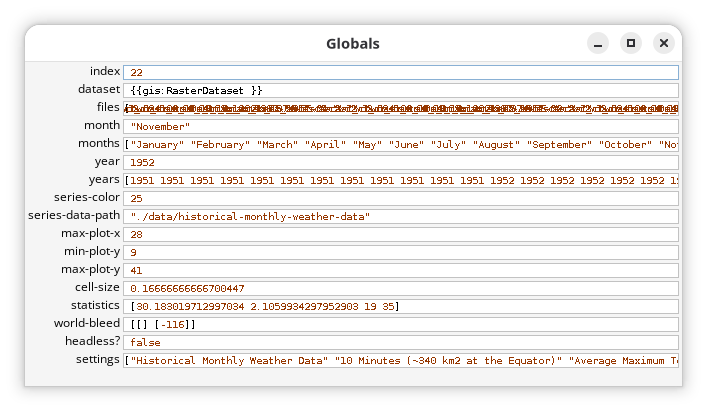
LogoClim global variables monitor during a simulation. Click on the image to enlarge it.
9.2 Logônia Global Variables
Some of the global variables of LogoClim must be shared with Logônia to enable the integration between the two models. The code below shows the global variable configuration of the Logônia model.
LogoClim insertions are denoted with ; LogoClim at the end of the line to make it easier to identify which parts of the code are specific to LogoClim and which are related to Logônia.
globals [
  seedling-12
  juvenile-12
  adult-12
  max-plot-x
  index ; LogoClim
  month ; LogoClim
  year ; LogoClim
  tmin-ls-model ; LogoClim
  tmax-ls-model ; LogoClim
  prec-ls-model ; LogoClim
  patch-coordinates ; LogoClim
  settings ; LogoClim
]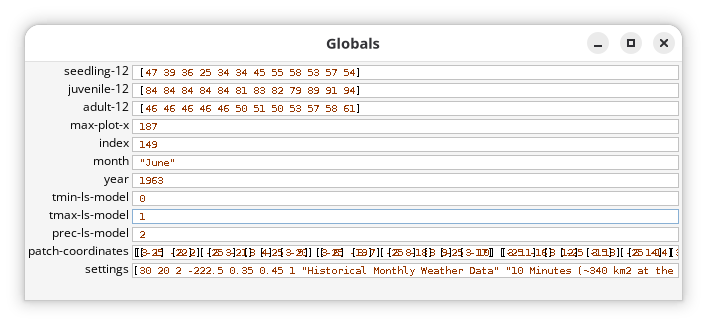
Logônia global variables monitor during a simulation. Click on the image to enlarge it.
The index, month, year variables are used to sync the state of the climate data in LogoClim with the world in Logônia.
The tmin-ls-model, tmax-ls-model, and prec-ls-model variables store the LevelSpace model IDs for minimum temperature, maximum temperature, and precipitation, respectively. In practice, this means three separate LogoClim instances run in parallel, each feeding its corresponding climate variable into Logônia. This gives you more flexibility, since each instance can use different data series or settings if needed, and it also keeps the code cleaner and easier to manage.
The patch-coordinates variable is used to store the coordinates of the LogoClim patches. This allows the model to correctly map the climate data from LogoClim to the corresponding patches in Logônia, ensuring that the climate conditions are accurately represented in the simulation.
At last, the settings variable is shared between the two models to keep track of the simulation’s configuration, which can be useful for debugging or when running multiple simulations with different settings.